


Beauty Camera: Selfie Editor
4.121.00 Reviews
App Specs
- Version
- 16.1
- Updated On
- License
- Free
- Downloads
- 1,000,000+
- Developer
- o16i Apps
- Categories
- Beauty
- Platform
- Android, iOS
Screenshots
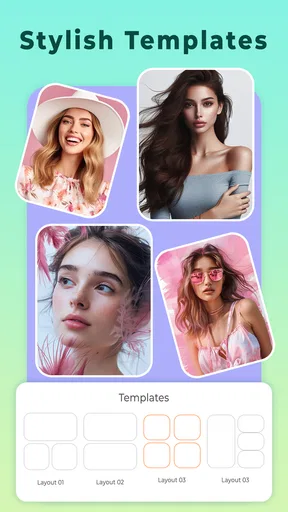
 Analysis by AppCompare
I treat a selfie editor as a small, practical tool rather than a replacement for a proper photo-editing app. Beauty Camera: Selfie Editor is aimed squarely at quick portrait touch-ups: I can take a photo, try beauty effects, and make adjustments without turning the process into a long editing session. That focus is useful when I want a presentable image in a hurry, though it also means the best results come from using the tools with a light hand.
What the free starting point means
The app is free to download, which makes it easy to try before deciding whether its style suits me. There are in-app purchases, with individual items ranging from $0.49 to $99.99, so I would check what a paid option includes and its price before confirming anything. The free download is a genuine low-commitment way to explore the editor, but it should not be mistaken for a promise that every option is free.
That distinction matters with beauty apps, where the appeal often comes from experimenting rather than relying on one tool. I would start by taking a few ordinary photos and testing the effects I actually expect to use. If the basic editing is enough for my routine, I can stop there; if a particular extra is important, I can decide whether its stated cost feels worthwhile instead of paying on impulse.
First Impressions
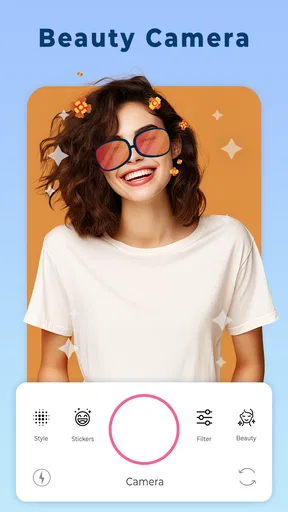
When I first opened the Beauty Camera: Selfie Editor, the user interface immediately caught my attention. It’s clean, intuitive, and packed with features without being overwhelming. The app is designed to get you straight to the point—taking that perfect selfie. You'll find the camera button right in the center, making it super easy to get started.
Features Galore
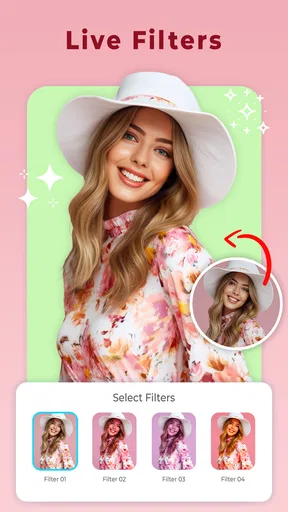
The feature set is where things get really exciting. From real-time facial filters to a comprehensive set of editing tools, this app has it all. I particularly liked the skin smoothing feature. With just a quick swipe, it magically gets rid of all those pesky blemishes and uneven tones. And don’t even get me started on the makeup options. You can choose from a variety of virtual lipstick shades, blushes, and even fake eyelashes.
One feature that stands out is the "auto-beautify" option. It's perfect for those days when you want a quick touch-up without having to tweak every little detail. Just a tap and voila, you're ready to post that selfie!
Making the effects look like me
My practical advice is to compare the edited image with the original before I settle on a version. Beauty effects can look appealing on a small phone screen, then feel much stronger when the picture is viewed larger. I prefer to treat smoothing and makeup as finishing touches, not automatic improvements: easing back an effect can preserve skin texture and keep the result recognizably mine.
Worth Reading Before You Choose

EA SPORTS FC Mobile 26 Is a Bigger Football Game, but It Takes Time

Flipboard Shows What News Apps Must Do Beyond the Feed

Switching to Android Auto Means Rethinking Your Driving Routine

Google Calendar Makes a Crowded Week Easier to Manage

Ludo King Makes the Most of the Minutes Between Plans

Baby Panda World Brings Quick Play to Modern Phones, but Its Game Library Feels Busy
For a profile picture, I would also check the crop before saving or sharing. A close selfie can make a subtle adjustment look more pronounced, while a little space around the face gives filters and makeup a less compressed feel. This is a useful way to avoid doing extra retouching when the real issue is simply framing or lighting.
The Editing Experience
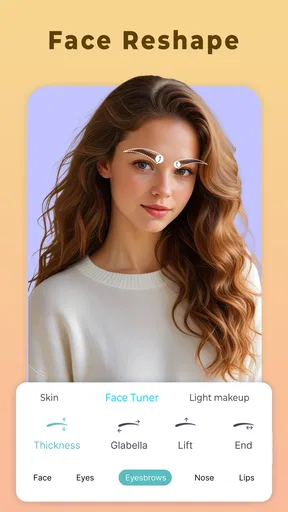
So, you've taken your selfie. Now what? Well, the editing suite gives you tons of options to fine-tune your photo. You can adjust the brightness, contrast, and saturation to bring out the best in your picture. I found the "reshape" tool to be quite interesting. It allows you to subtly adjust your facial features, although I’d recommend using it sparingly to keep things looking natural.
Another cool feature is the background editor. You can blur the background to make your face pop or even replace it with something completely different. It’s like having a mini Photoshop in your pocket.
A useful everyday workflow
Imagine I have a good photo from a casual lunch but the light has left my face looking flat. I can begin with brightness and contrast, then use a restrained beauty adjustment rather than stacking several strong effects. If the background distracts from the portrait, a little blur may help. I would check edges around hair and shoulders before sharing, since an edited background can draw attention when its transition looks unnatural.
That order is deliberate: correct the overall image first, then decide whether a face effect adds anything. It also makes it easier to spot which change improved the photo. If I apply auto-beautify at the beginning and then add more smoothing, makeup, and reshaping, the final result can quickly feel overworked. A simple before-and-after check is more useful than trying every control at once.
Where it fits among photo apps
Compared with a general photo editor, this app’s appeal is its portrait-first approach: face effects, makeup choices, and selfie adjustments are the center of the experience. A broader editor may be a better choice when I want precise control over many kinds of images or a more deliberate workflow beyond selfies. On the other hand, a camera app with only a few filters may feel limiting if I want to make separate adjustments after taking a picture.
I would choose this editor for a quick, playful portrait and reach for a more general tool when the job calls for detailed correction across a landscape, product photo, or a set of images that need consistent treatment. Neither approach is automatically better. The right choice depends on whether I value fast face-focused edits or more flexible control over the whole photograph.
Who is likely to get value
This is a good fit for someone who takes casual selfies, enjoys trying makeup effects, and wants editing options close at hand. It can also suit a person who would rather make a few visible adjustments than learn a complicated editing workflow. The app is free to start, and its beauty focus makes experimenting straightforward; anyone considering a purchase can weigh the specific option against how often they expect to use it.
I would skip it if I rarely take portraits, dislike face filters, or want highly controlled, natural-looking retouching for professional work. Reshape and smoothing tools can change the character of a face, so people who want an untouched image may find the main appeal unnecessary. For careful commercial editing or detailed color work, I would use a more specialized editor instead of expecting a selfie app to cover every need.
It is listed for Everyone, and the app is developed by o16i Apps. Beauty Camera has a 4.1 average from around 6,400 ratings and has passed one million installs, which gives a prospective user some indication of its reach without guaranteeing that its effects will suit their taste. It was released on September 15, 2018, and version 16.1 requires Android 6.0 or later.
Sharing without losing the final check
Once you're happy with your selfie, sharing it with the world is a breeze. The app integrates seamlessly with social media platforms like Instagram, Facebook, and Snapchat. You can directly upload your photos without ever leaving the app. It's incredibly convenient, especially if you're someone who loves to keep your followers updated.
Even when sharing is the goal, I would pause to look at the finished image once more. A portrait that looks balanced in the editor may read differently in a social feed, particularly if makeup or smoothing is more noticeable at thumbnail size. I also prefer to keep an unedited original when I might want a more natural version later. That small habit gives me a choice without having to recreate the photo.
Final Thoughts
All in all, the Beauty Camera: Selfie Editor is a fantastic tool for anyone who loves taking selfies. It's packed with features that allow you to enhance your photos effortlessly. Whether you're looking to perfect your skin tone, add a splash of makeup, or simply make your selfies pop, this app has got you covered.
And there you have it, folks. If you're someone who loves capturing moments and sharing them with the world, I'd say give this app a shot. It's a fun, user-friendly way to make sure you're always looking your best. Grab it from the app store and start snapping away!
My verdict is to try it if quick, face-focused editing is what you want, and to keep expectations specific: it is most appealing as a convenient selfie companion, not an all-purpose photo studio. Since it costs nothing to download, I can judge the basic experience for myself before deciding whether any optional purchase earns a place in my routine. If I want subtle results, I will use the controls selectively; if I want exact, professional retouching or prefer not to alter my appearance, I would skip the beauty effects and choose a different kind of editor.
Pros
- Easy-to-use interface for quick edits.
- Wide range of filters to enhance photos.
- Real-time beautification effects.
- Customizable editing tools for precision.
- Supports high-resolution image saving.
Cons
- Some features are locked behind paywall.
- Occasional ads can interrupt editing.
- Requires internet for certain functions.
- Limited free filter options available.
- Might slow down on older devices.
FAQs for Beauty Camera: Selfie Editor
What features does Beauty Camera: Selfie Editor offer?
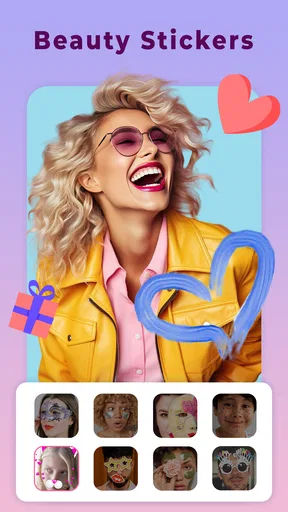
Beauty Camera: Selfie Editor provides a range of features designed to enhance your selfies. These include real-time beautification filters, skin smoothing, blemish removal, and virtual makeup tools. Additionally, the app offers adjustable lighting and color correction options, along with fun stickers and frames to personalize your photos.
Is Beauty Camera: Selfie Editor free to use?
The app is free to download and use, offering a variety of basic features at no cost. However, it may include in-app purchases or a subscription model to unlock premium features, such as advanced editing tools and exclusive filters. Users should review the pricing details on the app store before downloading.
How user-friendly is Beauty Camera: Selfie Editor?
Beauty Camera: Selfie Editor is designed with a user-friendly interface that makes it easy for both beginners and experienced users to navigate. The app provides intuitive controls and clear instructions, ensuring a seamless editing experience. Users can quickly access and apply various effects to their selfies with minimal effort.
Can I share my edited photos directly from the app?
Yes, Beauty Camera: Selfie Editor allows users to share their edited photos directly through the app. You can easily post your enhanced selfies to social media platforms like Instagram, Facebook, and Twitter, or send them via messaging apps. The app streamlines the sharing process, making it convenient for users to showcase their creativity.
Is Beauty Camera: Selfie Editor compatible with my device?
Beauty Camera: Selfie Editor is available for both Android and iOS devices. It requires a minimum operating system version, which can be found on the app’s download page on the respective app store. Users should ensure their device meets these requirements for optimal performance and compatibility.


